
Appearance
Speed, Search Engines and Privacy
Speed
Lynx is built to load quickly and to feel quick once loaded:
- A single-page app. After the first page, following a link loads only what changes, with no full page reload. No API required: it runs inside Magento, so there is no GraphQL layer or separate headless frontend to build and host.
- No legacy scripts. KnockoutJS, RequireJS, jQuery and the LESS stylesheets of Magento's standard theme are not loaded at all. Each page loads one script and one stylesheet, plus the code of the blocks it shows.
- Only what a page needs. Each block's code loads only on pages that use it.
- Images when needed. Images further down the page load as they scroll into view.
- Third-party scripts later. Google Analytics can wait for the first interaction, so it does not slow down the first view.
- Full page cache. Pages are served from Magento's full page cache.
Faster on the server
Lynx is also optimized on the server side, so Magento spends less time building each page.
When a page is not yet in the full page cache, for example after a cache flush or for a page nobody has visited yet, Magento builds a Lynx page 3 to 5 times faster than the same page in Magento's standard Luma theme:
| Page, not cached | Luma | Lynx | Faster by |
|---|---|---|---|
| Home page | 1.15 s | 0.21 s | 5.6× |
| Category page | 1.15 s | 0.32 s | 3.7× |
| Product page | 0.93 s | 0.18 s | 5.2× |
The first page after a deployment or a cache flush, when Magento rebuilds its caches, is also about 45% faster: 1.2 s instead of 2.2 s.
Measured on the same Magento installation and sample data, comparing a Lynx store view with a Luma store view. Times are the median time to first byte over several requests that missed the cache. The Lynx home page includes server-side rendering.
Lighthouse scores
Google Lighthouse rates a page from 0 to 100 on performance, accessibility, best practices and SEO. These are the scores of the home page of a test store with Magento's sample data, with server-side rendering on:
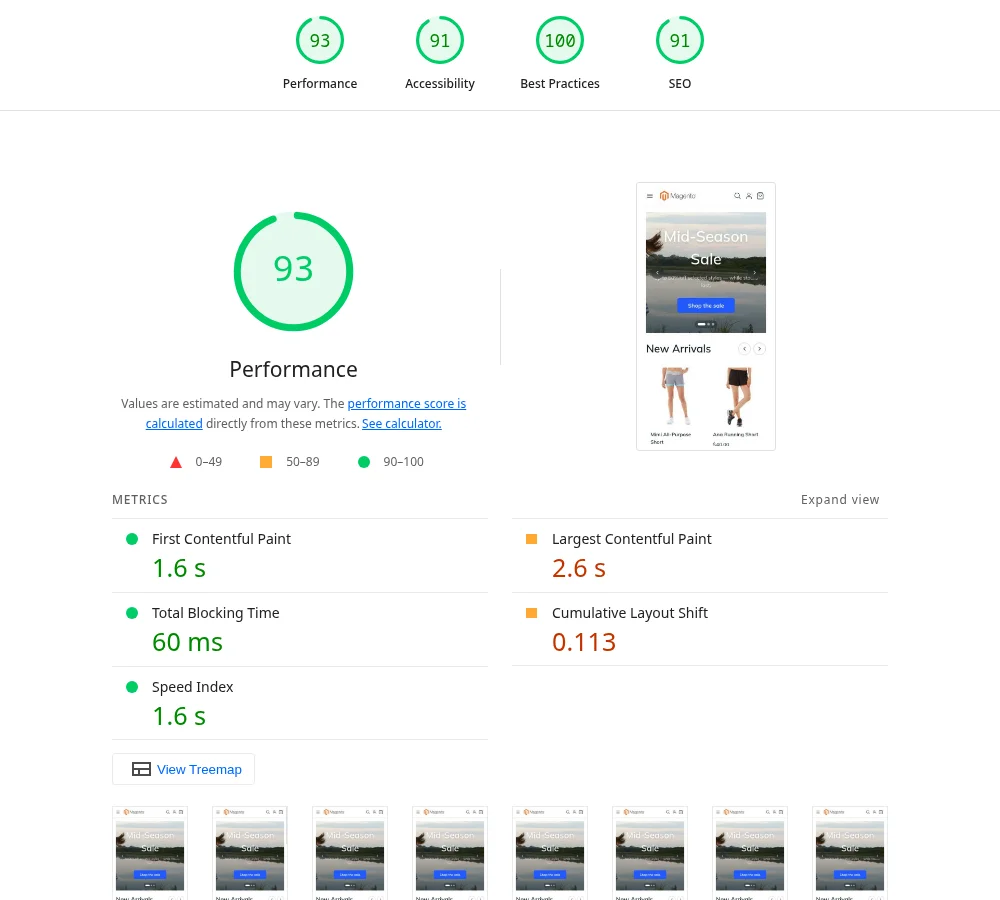
| Category | Mobile score |
|---|---|
| Performance | 93 |
| Accessibility | 91 |
| Best Practices | 100 |
| SEO | 91 |
| Metric | Mobile |
|---|---|
| First Contentful Paint | 1.6 s |
| Largest Contentful Paint | 2.6 s |
| Total Blocking Time | 60 ms |
| Speed Index | 1.6 s |
Measured with Lighthouse 13 in its mobile mode, which simulates a mid-range phone on a slow 4G connection. Scores vary with your hosting, your catalog, your images and the extensions you install, so measure your own store with PageSpeed Insights.
Search engines
Pages are real web pages with their own address, title and description from Magento. Meta titles, meta descriptions and robots settings for products, categories and CMS pages come from Magento as usual.
Personal pages, such as the cart, checkout, account and order pages, are marked so that search engines do not index them.
For the best results with search engines, your developer can turn on server-side rendering. See Server-side Rendering.
Analytics
The Google Analytics 4 block sends page views and ecommerce events: product lists, product views, add to cart, removals, cart views, checkout steps and purchases. Setup is described in Site-wide blocks.
Cookie consent
The Cookie Consent block shows a notice with accept and decline buttons. Analytics can be set to load only after a shopper accepts. See Site-wide blocks.
reCAPTCHA
Lynx forms follow Magento's Google reCAPTCHA settings in Stores › Configuration › Security › Google reCAPTCHA Storefront. Choose the reCAPTCHA type for each form there, such as sign in, create account, forgot password and contact, and Lynx shows it on the matching form. The reCAPTCHA script loads only when a shopper starts filling in a protected form.